What Is IPTV and How Does It Work? A Plain-English Guide for 2026
IPTV is live TV delivered over your internet connection instead of a dish or a cable. What it stands for, how a stream reaches your screen, what you need to watch it, and how…
Short answer
IPTV stands for Internet Protocol Television: live TV channels, films and series delivered over your normal internet connection instead of through a satellite dish, an aerial or a cable company’s wiring. You get a login from an IPTV provider, enter it once into a player app on your TV, Firestick, phone or computer, and the app streams the channels. There is no box to rent and no engineer to book — you need a device you already own, a stable connection of about 15 Mbps or more, and a subscription.
This guide is written for someone who has heard the word and wants to know what it actually means before spending money. It covers what IPTV is, how a channel gets from a server to your sofa, what you need to watch it, what it costs, and the honest list of things that go wrong. If you already know all of that and just want to set it up, skip to the IPTV setup guide.
What IPTV Means, in One Paragraph
Traditional television arrives through a dedicated pipe: a satellite signal, an antenna signal or a cable company’s coaxial line, broadcasting every channel at once whether you watch it or not. IPTV turns that around. The channels sit on servers, and your device asks for one channel at a time over the same internet connection you use for Netflix or YouTube. Because the picture travels as ordinary internet data — packets addressed with the Internet Protocol — it can reach any screen that has an internet connection and an app that understands the format.
That one difference explains almost everything else about IPTV: why the channel list can be enormous (servers are not limited by the frequencies of a cable line), why it works in any country, why it needs a decent internet connection, and why the quality depends as much on your home network as on the provider.
How IPTV Works: From Server to Sofa
Every IPTV stream passes through five links. When something goes wrong, it is always one of these five, so it is worth knowing them by name:
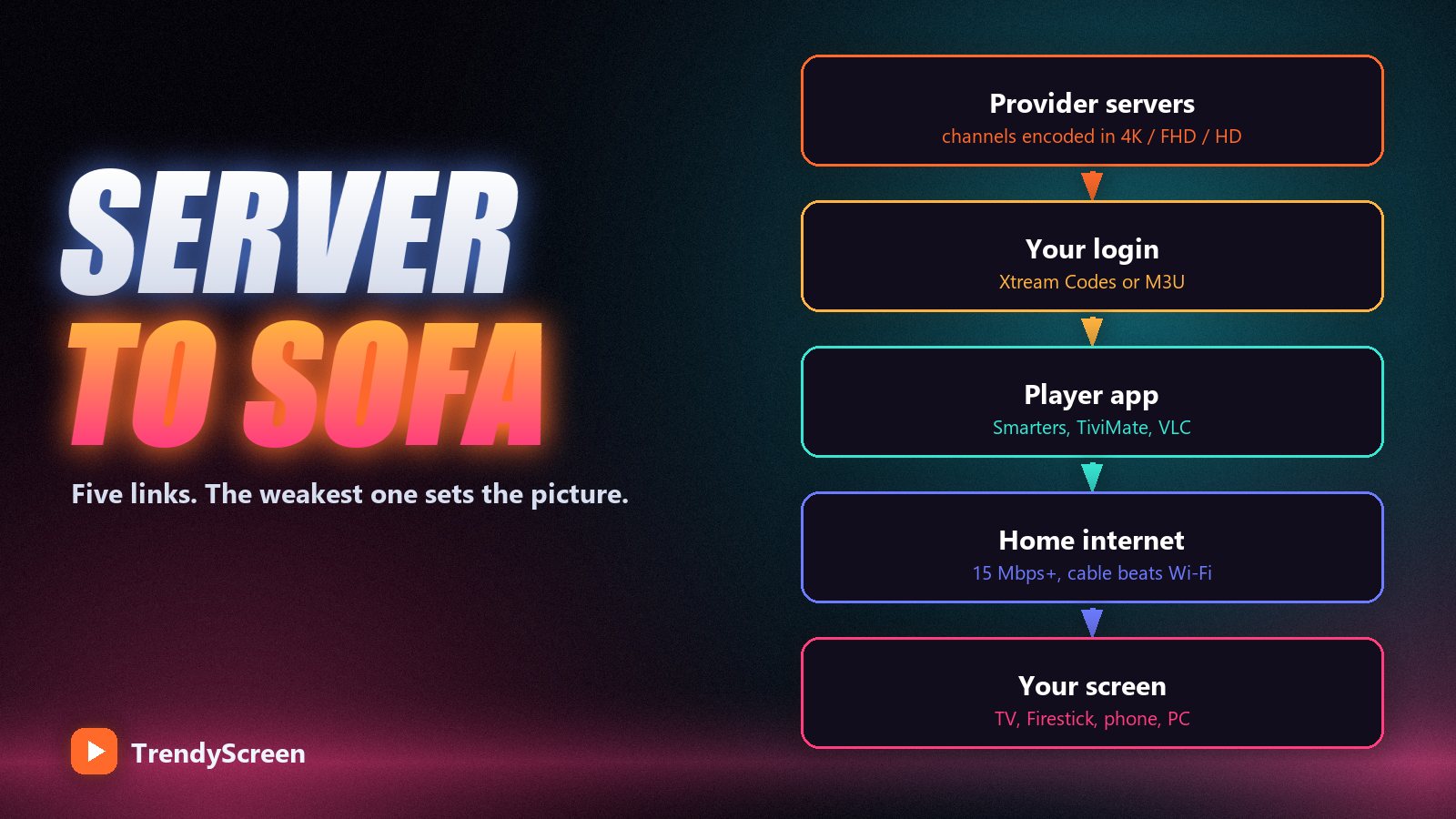
- The provider’s servers. They receive the channel feeds, encode them into several qualities (SD, HD, FHD and 4K where the broadcaster supplies it) and send them out on request. Good providers spread customers across many servers so that a big match on Saturday does not overload one machine.
- Your login. The provider gives you credentials in one of two formats: Xtream Codes (a server URL, a username and a password) or an M3U link (a single long URL containing the whole playlist). Both point your app at the right servers. The difference between them is explained in Xtream Codes vs M3U.
- The player app. IPTV Smarters Pro, TiviMate, IBO Player, Smarters Player Lite, VLC and dozens of others. The app does not contain any channels itself — it is an empty player until you log in. That is why you can switch apps at any time without buying anything again.
- Your internet connection. A live stream needs a steady flow of data: roughly 8 Mbps for HD, 15–25 Mbps for Full HD and 25–30 Mbps for 4K. Stability matters more than the headline speed, which is why a wired Ethernet cable beats Wi-Fi.
- Your screen. A smart TV, a Firestick, an Android box, a phone, a tablet or a computer. Anything that runs one of the player apps will do.
What You Actually Get With an IPTV Subscription
An IPTV subscription is usually three products in one login:
- Live TV. Channels as they are broadcast — news, sport, entertainment, kids, documentaries and international channels. TrendyScreen carries 75,000+ live channels across more than 60 countries.
- Video on demand (VOD). A library of films and complete series you can start whenever you like, much like a streaming app. On TrendyScreen that is 240,000+ films and 20,000+ series.
- An electronic programme guide (EPG) and catch-up. The TV-guide grid that shows what is on now and next, plus the ability to replay recent programmes on supported channels. If the guide is the part that confuses you, read what EPG means on IPTV.
| Cable / satellite | IPTV | |
|---|---|---|
| How it arrives | Dedicated cable, dish or aerial | Your existing internet connection |
| Equipment | Rented box per TV, installation visit | An app on a device you already own |
| Channels | A regional bundle, extras sold as packs | Tens of thousands, international included |
| Contract | Usually 12–24 months | Prepaid plans, nothing renews on its own |
| Works when you travel | Only at the installed address | Anywhere with internet |
| Depends on your internet | No | Yes — it needs a stable connection |
The last row is the honest trade-off. Cable keeps working when your broadband is down; IPTV does not. Everything else in the table favours IPTV, which is why so many households have moved. The full cost comparison is in IPTV vs cable TV.
What You Need to Watch IPTV
- A device. The most popular choice is an Amazon Firestick, because it is cheap and plugs straight into the TV. A Samsung or LG smart TV works on its own with the right app; an Android TV box or Nvidia Shield is the premium option. See the best IPTV boxes if you are buying one.
- A player app. Free to start with: IPTV Smarters Pro on a Firestick, TiviMate on Android TV, Smarters Player Lite on Apple devices, VLC on a computer. Our comparison of the best IPTV players covers the differences.
- An internet connection of 15 Mbps or more. Measured on the device you watch on, not on your phone in another room. Below that you will see buffering no matter which provider you choose.
- A subscription. This is the part you pay for: the login that gives the app something to play.
How to Get IPTV, Step by Step
Getting IPTV takes about ten minutes, most of it installing the app:
- Test before you pay. Ask the provider for a free trial line. TrendyScreen gives a 24-hour trial on WhatsApp with no card required. A provider that refuses any kind of test is telling you something.
- Install the player app on the TV or stick you will actually use.
- Enter the login — Xtream Codes if the app supports it, because it unlocks the guide and the film and series tabs.
- Watch at your busiest hour. An afternoon test proves little. Watch a live match on a weekend evening, when servers are under the most load.
- Choose a plan once it holds up. Short plans for testing, longer plans for a lower monthly cost and more screens.
How Much IPTV Costs
A properly run service costs roughly $5 to $15 a month depending on the length of the plan. TrendyScreen’s prices are public: $15 for one month, $35 for three months, $55 for six months, $80 for a year on 2 devices, $120 for two years on 3 devices, and a Lifetime plan at $150 once on 5 devices. Every plan opens the same full library. Anything advertised at $1 a month or “lifetime for $20” is a different, much riskier product — how much IPTV should cost explains why.
Is IPTV Legal?
IPTV is a delivery technology, and the technology itself is legal everywhere — many cable companies and broadcasters use it to deliver their own channels. What matters legally is whether the content is distributed with the rights to do so, and the rules differ from country to country. Check the law where you live, buy from a provider with a real website, published prices and a normal checkout, and treat any seller that only takes gift cards or only sells in private messages as a red flag.
What Goes Wrong With IPTV (and How Often It Is Your Network)
The three complaints people have about IPTV are buffering, a channel that will not load, and a TV guide that is empty or wrong. In our support queue, most of them turn out to be in the home rather than on the server:
- Buffering is usually Wi-Fi. A $5 Ethernet cable fixes more freezing than any app setting. The full list is in how to fix IPTV buffering.
- Nothing loads at all is usually a typo in the server URL, an expired plan or more screens playing than the plan allows. See IPTV Smarters Pro not working.
- One channel fails is a source problem on the provider’s side. Tell support the exact channel name; a good provider replaces it quickly.
The 60-second health check. If something stops working, open the same login on your phone using mobile data. If it plays there, the service is fine and the fault is your TV, app or Wi-Fi. If it fails there too, message the provider.
Frequently Asked Questions
What does IPTV stand for?
IPTV stands for Internet Protocol Television. It means television delivered as internet data, using the same Internet Protocol that carries web pages and video calls, instead of through a satellite dish, an aerial or a cable line.
How does IPTV work?
The provider’s servers hold the channels. Your player app logs in with Xtream Codes or an M3U link and requests one channel at a time over your internet connection, and the server streams it to your screen. Nothing is installed on your router and no dish or cable is involved.
Do I need a special box for IPTV?
No. Any device that runs a player app works: a smart TV, an Amazon Firestick, an Android TV box, an iPhone or Android phone, a tablet, or a Windows or Mac computer. A dedicated box only helps if your TV is old or slow.
What internet speed do I need for IPTV?
At least 15 Mbps for a stable picture, about 25 Mbps for Full HD and 30 Mbps or more for 4K. A stable connection matters more than a fast one, and a wired Ethernet cable is more reliable than Wi-Fi.
Can I watch IPTV on more than one TV?
Yes, within your plan’s limit. You can install the app on as many devices as you like; the limit counts screens playing at the same time. On TrendyScreen that is 1 screen on the 1-, 3- and 6-month plans, 2 on the 1-year plan, 3 on the 2-year plan and 5 on Lifetime — explained in IPTV on multiple devices.
Is IPTV better than cable?
For most households it is far cheaper and carries far more channels, with no rented equipment and no contract. Cable still wins if your internet is slow or unreliable, because IPTV can only be as good as the connection it arrives through.
See what IPTV looks like on your own TV
TrendyScreen: 75,000+ live channels and 260,000+ films and series, a 7-day guide, from $5 a month or $150 once for Lifetime on 5 devices. Take the free 24-hour trial before you pay anything.
Keep Reading
IPTV Smarters Pro Not Working? 12 Fixes That Get You Watching Again
Black screen, endless spinner or "invalid username" in IPTV Smarters Pro? Twelve fixes, in the order a support agent actually…
Read more →
Watch Live Sports Anywhere With TrendyScreen: The Complete Match-Day Guide
Football, NFL, NBA, UFC and F1 from any country, on any screen. The match-day checklist, the best box for sport,…
Read more →
Reddit’s “Best IPTV” Threads, Decoded: How to Read Them Without Getting Burned
Reddit is where people go for an unfiltered answer on IPTV — and where half the replies are planted. Here…
Read more →