How Many Devices Can Use One IPTV Subscription? Connections Explained
Installs are unlimited, simultaneous streams are not. What an IPTV "connection" really counts, what happens when you go over, and how many screens each TrendyScreen plan allows — from 1 up to 5.
Short answer
You can install an IPTV subscription on as many devices as you like; the limit is how many play at the same time. That number is called connections. On TrendyScreen it grows with the plan: 1 screen on the 1-, 3- and 6-month plans, 2 screens on the 1-year plan, 3 screens on the 2-year plan and 5 screens on the Lifetime plan. Go over the limit and the extra stream stops or refuses to start — nothing breaks, and it plays again the moment another screen is switched off.
“Can I use it on my other TV?” is the question support answers most, usually right after someone’s partner started watching in the bedroom and the living-room stream stopped. Here is exactly what is counted, why providers limit it, and how to pick the plan that fits the number of screens in your home.
Installs vs Streams: The Only Distinction That Matters
An IPTV login is a set of credentials, not a licence tied to one box. You can enter it on the living-room TV, a Firestick in the bedroom, your phone, a tablet and a laptop, and all of them will show the channel list. What the server counts is active streams: how many of those devices are playing a channel, a film or a catch-up programme at that moment.
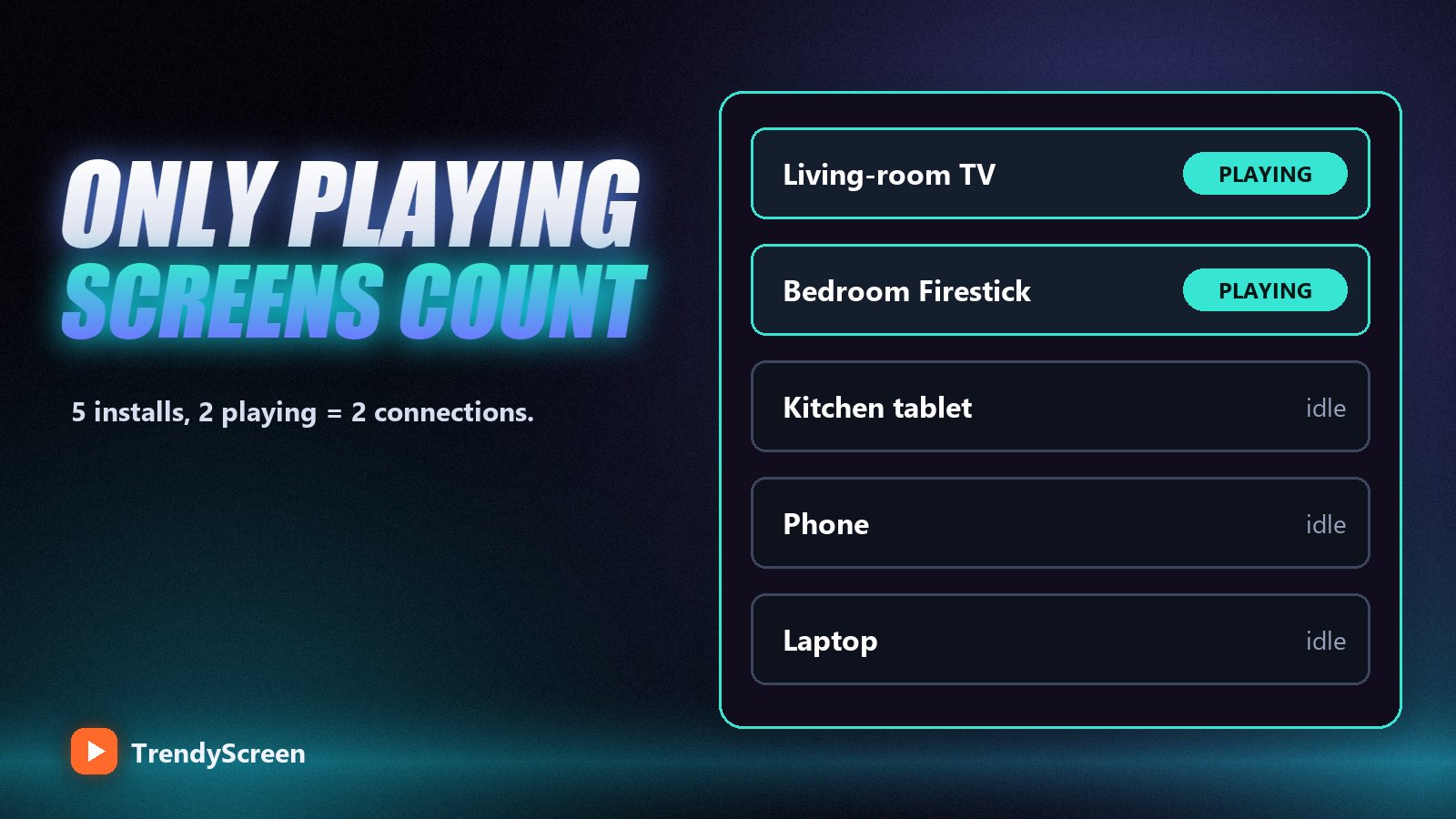
- Counts: any device playing live TV, a film, a series episode or catch-up — including a TV left playing in an empty room.
- Does not count: a device sitting on the menu or channel list, a closed app, a device that is switched off.
- Sometimes counts for a minute: a stream you just stopped. Some players hold the connection open for up to a minute after you press back, which is why switching quickly between two TVs can trip a 1-screen plan.
How Many Screens Each TrendyScreen Plan Allows
| Plan | Price | Screens at the same time | Typical household |
|---|---|---|---|
| 1 Month | $15 | 1 | Testing, one TV |
| 3 Months | $35 | 1 | One TV, one sports season |
| 6 Months | $55 | 1 | One main TV |
| 1 Year | $80 | 2 | A couple, two TVs |
| 2 Years | $120 | 3 | A small family |
| Lifetime | $150 once | 5 | The whole house |
Every plan opens the same library — 75,000+ live channels, 240,000+ films and 20,000+ series — so the screen count is the main reason to choose a longer plan beyond the lower monthly price. The one-time Lifetime plan is covered in detail in is a lifetime IPTV subscription worth it.
Why IPTV Providers Limit Connections
Every stream is a separate flow of data from the server to your home. A 4K channel uses around 25 Mbps of the provider’s bandwidth for as long as it plays. Providers plan their server capacity around the number of screens customers are allowed, so that a full house on a Saturday night does not slow everyone down.
That is also why “unlimited devices” offers are a warning sign. A service that lets any number of streams run on one cheap login has either not planned its capacity or is oversold — and oversold servers are the main cause of the evening buffering people complain about on forums. A clear, stated limit is a sign the provider has done the arithmetic.
What Happens When You Go Over the Limit
The exact behaviour depends on the player app, but it is always one of these:
- The new stream refuses to start and shows a message about maximum connections.
- The new stream starts and the oldest one stops.
- Both stutter for a moment and one of them drops.
Nothing is damaged and the account is not blocked. Stop one stream, wait about thirty seconds, and the other plays normally. If you see the connection message when only one screen is on, another device is still holding a stream — often a TV left playing in another room, or a phone that kept the player open in the background.
Two TVs, one-screen plan? It works as long as you never watch on both at once. Close the player properly (press back to the menu, do not just switch the TV off at the wall) and the connection frees up within a minute.
Choosing the Right Plan for Your Household
- Count the peak, not the devices. Think of your busiest evening: how many screens are playing at the same time? That number, not the number of devices you own, is what you need.
- Add one for sport. Big matches pull people to separate rooms. If your household splits on match days, allow one extra screen.
- Match the plan. One screen: 1, 3 or 6 months. Two: 1 year. Three: 2 years. Four or five: Lifetime.
- Check the connection can carry it. Each Full HD stream needs about 15–25 Mbps and each 4K stream about 25–30 Mbps. Three 4K TVs at once need a connection of at least 100 Mbps. Our buffering guide explains how to test it properly.
Setting Up Each Device
Every device uses the same login details. Install the app that suits each one — IPTV Smarters Pro on a Firestick, TiviMate on Android TV, Smarters Player Lite on iPhone and iPad, VLC on a computer — and log in with the same Xtream Codes details. Give each device’s profile a different name if your app supports it, so you can tell them apart. The full device-by-device walkthrough is in our IPTV setup guide.
Frequently Asked Questions
Can I use one IPTV subscription on two TVs?
Yes. You can install it on both, and watch on both at the same time if your plan allows two connections. On TrendyScreen that means the 1-year plan (2 screens), the 2-year plan (3 screens) or Lifetime (5 screens).
What is an IPTV connection?
A connection is one active stream: one device playing a live channel, film or series at that moment. Devices that are switched off or sitting on the menu do not use a connection.
How many devices can I install IPTV on?
As many as you like. The installation is not limited; only the number of screens playing simultaneously is.
What happens if I exceed my connection limit?
The extra stream either refuses to start or stops the oldest one. Nothing is blocked or damaged; close one stream, wait about thirty seconds and the other plays normally.
Which TrendyScreen plan has 5 devices?
The Lifetime plan: $150 paid once, with 5 screens streaming at the same time. The 2-year plan has 3 screens and the 1-year plan has 2.
Does watching on more screens slow down my IPTV?
Only if your home internet cannot carry all the streams at once. Each Full HD stream needs roughly 15–25 Mbps; add them up and compare with your real speed. A wired connection on the main TV helps the most.
One login for every screen in the house
TrendyScreen: 2 screens on the 1-year plan, 3 on 2 years, 5 on Lifetime — the same 75,000+ channels and 260,000+ films and series on every plan. Free 24-hour trial first.
Keep Reading
IPTV vs Cable TV in 2026: The Honest Cost Breakdown (And Who Should Actually Switch)
A realistic cable bill is $155–$220 a month. TrendyScreen is $5–$15. Here is the real math, the two cases where…
Read more →
What Is IPTV and How Does It Work? A Plain-English Guide for 2026
IPTV is live TV delivered over your internet connection instead of a dish or a cable. What it stands for,…
Read more →
Watch Live Sports Anywhere With TrendyScreen: The Complete Match-Day Guide
Football, NFL, NBA, UFC and F1 from any country, on any screen. The match-day checklist, the best box for sport,…
Read more →