How to Install IPTV Smarters Pro on Firestick (2026 Step-by-Step Guide)
Developer options are hidden on new Fire TV Sticks. Here is how to unlock them, sideload IPTV Smarters Pro with Downloader, log in with Xtream Codes and set the app up so it does…
Short answer
To install IPTV Smarters Pro on a Firestick: turn on Developer Options (Settings → My Fire TV → About → click the device name seven times), install the Downloader app from the Amazon Appstore, allow Downloader to install unknown apps, then use Downloader to fetch the Smarters APK from the official IPTV Smarters website and install it. Open the app, choose Login with Xtream Codes API, and enter the server URL, username and password your provider sent you. The whole job takes about ten minutes.
Amazon does not list IPTV Smarters Pro in most regions’ Appstore, so on a Firestick it is installed the same way as any app from outside the store: by sideloading. That sounds technical; it is four menu changes and one download. This guide covers every Fire TV Stick model, including the newer ones where Amazon hid the setting you need, and the five settings worth changing on day one.
Before You Start
- Your login details. Server URL (it starts with
http://and usually ends with a port number such as:8080), username and password. If you are a TrendyScreen customer they arrive on WhatsApp and by email within minutes of ordering; if you just want to test, ask for the free 24-hour trial. - A Fire TV Stick, Fire TV Stick 4K, 4K Max or Fire TV Cube connected to the internet. Every current model works.
- Five minutes of storage. The APK is small, but a full Firestick refuses to install anything. If you are short of space, uninstall an app you never use first.
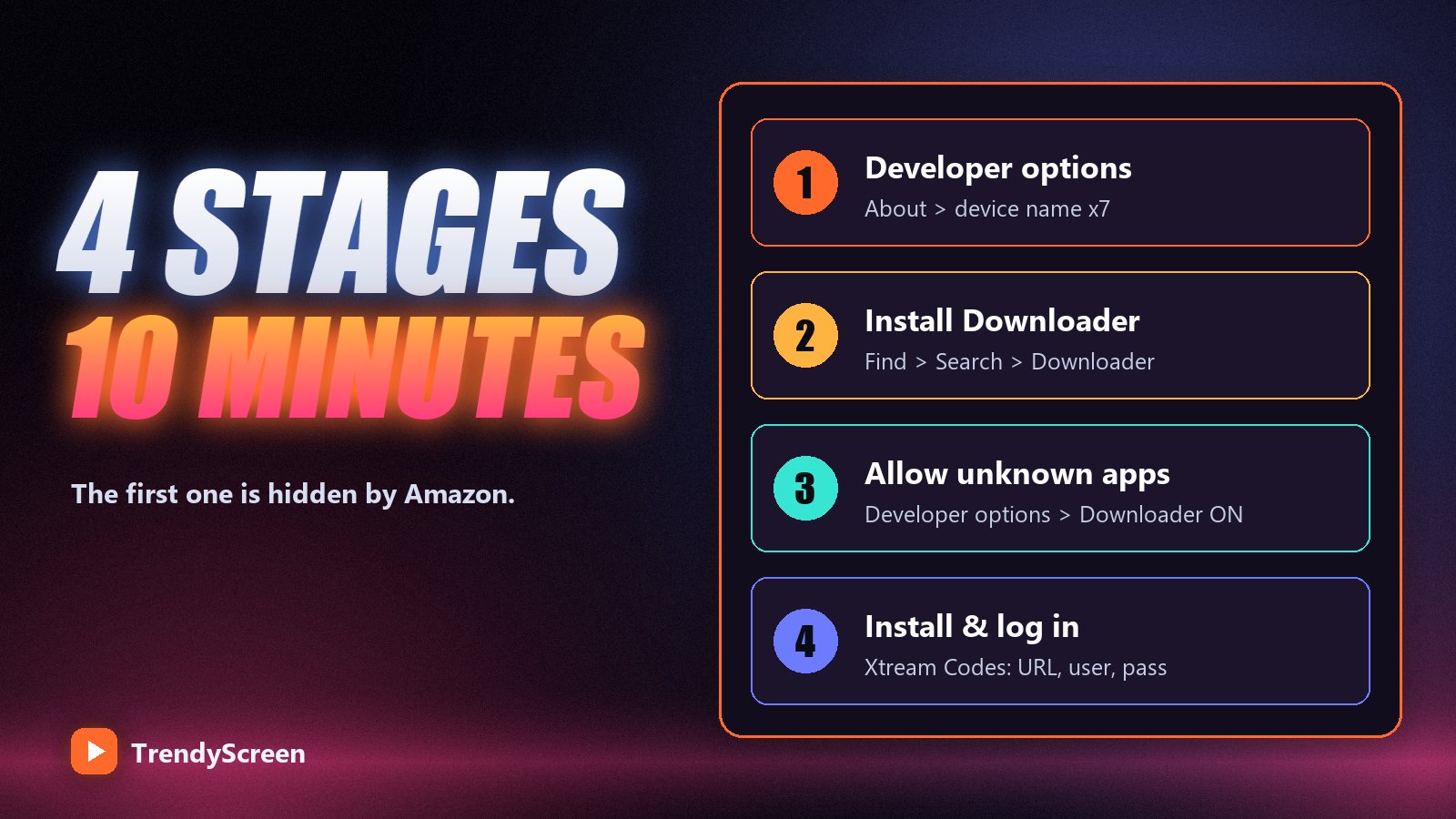
Step 1: Turn On Developer Options
On older Fire OS versions, Developer Options sat in the settings menu waiting for you. On sticks updated in the last couple of years, Amazon hides it until you unlock it:
- From the home screen, open Settings (the gear icon on the far right).
- Choose My Fire TV, then About.
- Highlight the first line — your device name, for example Fire TV Stick 4K — and press the select button on the remote seven times. A message says you are now a developer.
- Press back once. Developer Options now appears under My Fire TV.
Already see Developer Options? Then your stick is on an older Fire OS and you can skip straight to step 2. On those versions the setting you need later is called Apps from Unknown Sources rather than Install Unknown Apps.
Step 2: Install the Downloader App
Downloader is a free app in the Amazon Appstore whose only job is to fetch a file from a web address and install it. It is the standard tool for sideloading on Fire TV.
- On the home screen, open Find → Search.
- Type Downloader and select the app with the orange icon.
- Choose Get or Download. It installs in a few seconds.
Step 3: Allow Downloader to Install Apps
- Go to Settings → My Fire TV → Developer Options.
- Select Install unknown apps.
- Find Downloader in the list and switch it to ON.
This permission applies to Downloader only. It does not open your stick to anything else, and you can switch it off again once Smarters is installed.
Step 4: Download and Install IPTV Smarters Pro
- Open Downloader. Allow it access to storage when asked, and dismiss the quick-start notes.
- In the address box on the Home tab, type the address of the official IPTV Smarters website and open its Downloads page. Choose the Android / Firestick APK.
- When the download finishes, the Android installer opens. Select Install.
- When it says App installed, choose Done rather than Open. Downloader then offers to delete the installer file — select Delete twice. You do not need the APK any more and Firesticks are short on space.
Only download the APK from the official IPTV Smarters site. Re-uploaded copies on random file-sharing pages are the one real risk in this whole process: they can be outdated, broken or modified. If an address asks you to install a second “helper” app, back out.
Step 5: Log In With Xtream Codes
- Open IPTV Smarters Pro from Your Apps & Channels. Accept the terms on first launch.
- Choose Login with Xtream Codes API. It unlocks the TV guide and the Movies and Series sections; the M3U option works but gives you a flatter list.
- Fill in the four fields:
- Any name — a label for the profile, such as TrendyScreen.
- Username and Password — exactly as sent, both case-sensitive.
- URL — the full server address including
http://and the port, with no space at the end.
- Select Add User. The app downloads the channel list, films, series and guide. The first load takes a minute or two; later launches are fast.
If you get invalid username or password, it is almost always a typo, a capital letter, or a trailing space copied with the password. Type the details by hand rather than pasting from a message, and check the URL starts with http://. Still stuck? The full list of fixes is in IPTV Smarters Pro not working.
Five Settings to Change on Day One
- Move the app to the front. Hold the Home button, open Apps, highlight Smarters, press the menu button (three lines) and choose Move to front. Now it is one click from the home screen.
- Use the hardware decoder. In the player settings, choose the hardware decoder. It uses the Firestick’s video chip instead of its processor, and fixes most stutter on 4K and FHD channels.
- Load the guide. Open Live TV and let the EPG finish downloading. If the guide is blank, refresh it from settings — and see what EPG is and how to fix it if it stays empty.
- Turn on automatic updates. In the automation settings, let the app refresh channels and the guide when it starts. Otherwise new channels and replaced feeds do not appear until you refresh by hand.
- Hide what you do not watch. With 75,000+ channels, hiding categories from countries you never watch makes the list load faster and zapping much easier. Use Favourites for the twenty channels you actually watch.
Check the Firestick’s Connection
The Firestick sits behind the television, which is often the worst Wi-Fi spot in the room. Go to Settings → Network, highlight your network and press the Play/Pause button to run Amazon’s connection check. If it reports less than about 25 Mbps, or the stream buffers in the evening, an Ethernet adapter for Fire TV (around $15) usually solves it for good. Our IPTV buffering guide has the rest of the fixes in order.
Alternatives if Smarters Is Not for You
Your login is not tied to one app. The same Xtream Codes details work in TiviMate (the best guide layout on Fire TV, also sideloaded with Downloader), IBO Player and XCIPTV. If you want to try one quickly on a computer first, VLC plays the M3U link in under a minute. The pros and cons of each are in the best IPTV player apps.
Frequently Asked Questions
Is IPTV Smarters Pro on the Amazon Appstore?
In most regions it is not, which is why it is installed by sideloading with the free Downloader app. If your region’s Appstore does list it, installing from the store is simpler and gives you automatic updates.
Why can’t I find Developer Options on my Firestick?
Newer Fire OS versions hide it. Go to Settings, My Fire TV, About, highlight your device name and press select seven times. Developer Options then appears under My Fire TV.
Is it safe to allow unknown apps on a Firestick?
Yes, as long as you only download from the official source of the app you want. The permission applies only to the app you grant it to, such as Downloader, and you can switch it off again after installing.
Does IPTV Smarters Pro come with channels?
No. Smarters is an empty player. The channels come from your IPTV subscription: you log in with the Xtream Codes details or M3U link from your provider, and the app plays them.
Can I use the same login on my Firestick and my phone?
Yes. Install the app on as many devices as you like. The limit is how many play at the same time: on TrendyScreen 1 screen on the short plans, 2 on the 1-year plan, 3 on 2 years and 5 on Lifetime.
Why does IPTV Smarters Pro buffer on my Firestick?
Usually weak Wi-Fi behind the TV, the software decoder, or a full cache. Switch to the hardware decoder, clear the app cache in Settings, Applications, and try an Ethernet adapter. If every app on the stick is slow, the problem is the network rather than Smarters.
Your Firestick is ready. Now give it something to play.
TrendyScreen works in IPTV Smarters Pro, TiviMate and every Xtream Codes player — 75,000+ live channels and 260,000+ films and series, from $5 a month. Start with the free 24-hour trial.
Keep Reading
How to Watch IPTV on VLC (Windows, Mac, Android and iPhone)
VLC plays an IPTV M3U link in under a minute on any computer or phone. The exact menus on each…
Read more →
Xtream Codes vs M3U URL: Which IPTV Login Should You Use?
Xtream Codes API or one long M3U link? Same subscription, very different results. What each format is, which players prefer…
Read more →
IPTV vs Cable TV in 2026: The Honest Cost Breakdown (And Who Should Actually Switch)
A realistic cable bill is $155–$220 a month. TrendyScreen is $5–$15. Here is the real math, the two cases where…
Read more →