What Is EPG on IPTV? How the TV Guide Works and How to Fix a Missing One
EPG is the TV-guide grid in your IPTV app. Where the data comes from, why it goes blank or shows the wrong times, and the seven fixes that bring it back in IPTV Smarters,…
Short answer
EPG stands for Electronic Programme Guide — the TV-guide grid in your IPTV app that shows what is on now, what is next and the schedule for the coming days. The data comes from your provider as a separate file (called XMLTV) and is matched to each channel by an ID. When the guide is blank or wrong, the cause is almost always that the guide was never downloaded, it is out of date, the channel IDs do not match, or the time offset is wrong. Logging in with Xtream Codes instead of M3U and refreshing the guide fixes most cases in a minute.
A good guide is the difference between IPTV that feels like television and a list of 75,000 channel names. This page explains how the guide actually reaches your screen, so the fixes make sense, then works through every reason it goes missing in the order support checks them.
What the EPG Shows You
- Now and next on every channel, usually as a line under the channel name.
- A grid of channels down the side and times across the top, like a printed TV listing. TrendyScreen carries 7 days of guide data on most major channels.
- Programme details — title, description, sometimes the episode number.
- The entry point to catch-up. On channels that support it, you scroll back in the guide and select a programme that has already aired to watch it. Without a working guide, catch-up is much harder to use.
Where EPG Data Comes From
The picture and the guide travel separately. The stream comes from the channel’s video server; the guide comes from an XMLTV file — a large text file listing every programme on every channel for the next few days. Your app downloads that file, then links each programme list to the right channel using a channel ID (a tag such as bbcone.uk).
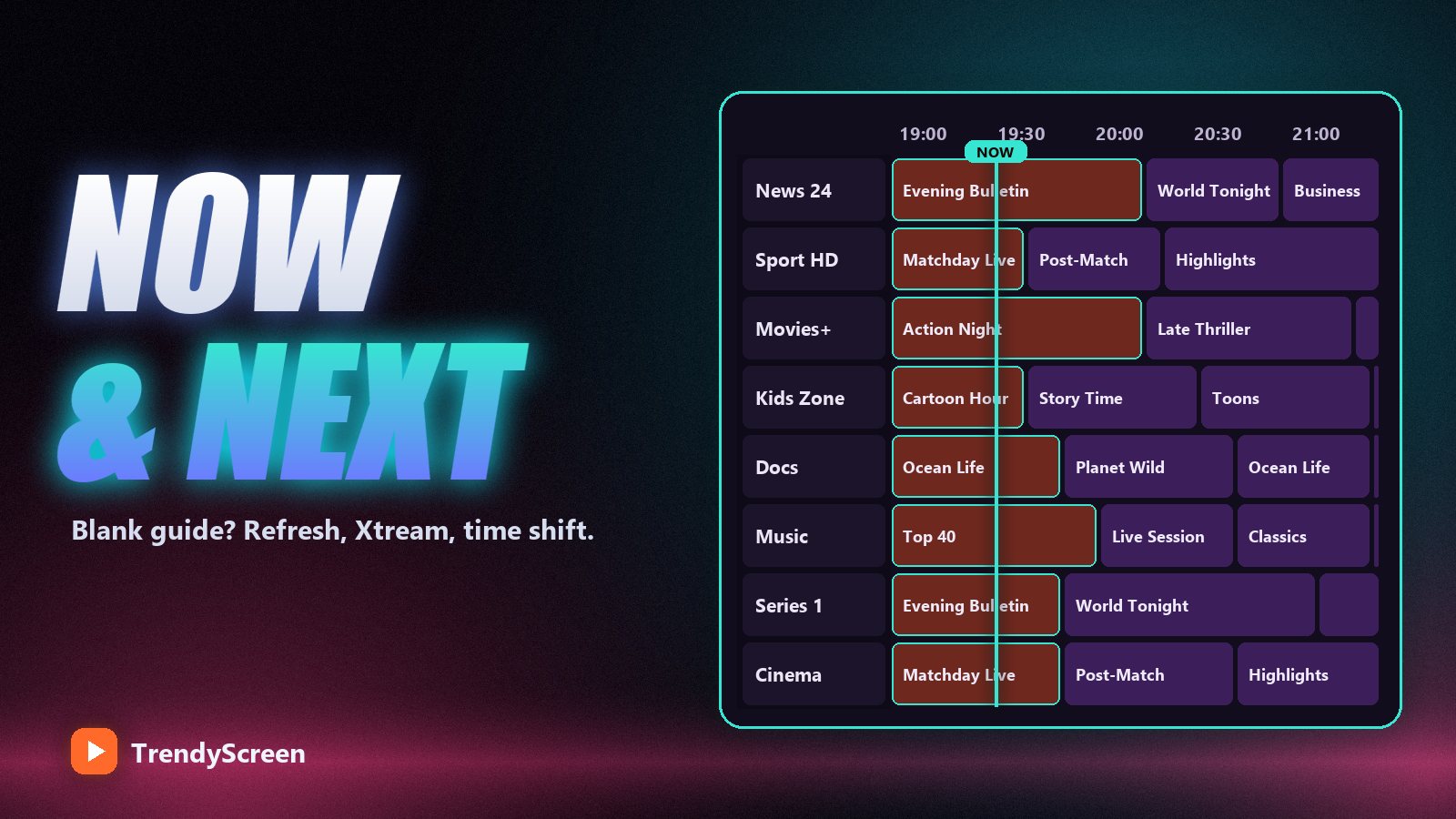
That gives three ways for the guide to fail: the file was not downloaded, the file is old, or the IDs do not match. A fourth problem — times that are an hour or two off — is a time-zone setting, not missing data.
Xtream Codes Gives You the Guide Automatically
If you log in with Xtream Codes (server URL, username, password), the app knows where the provider’s guide lives and downloads it for you. With an M3U link, many apps load only the channels, and you must add the EPG address by hand. That single difference explains most “my guide is empty” messages. If your app supports Xtream Codes, use it — the reasons are covered in Xtream Codes vs M3U.
If you must use M3U, ask your provider for the EPG URL (sometimes called the XMLTV link) and paste it into the app’s EPG or guide settings. For Xtream-style services it usually follows the pattern http://server:port/xmltv.php?username=XXX&password=YYY, using your own details.
Seven Fixes for a Missing or Wrong EPG
- Give it time on first login. The guide for tens of thousands of channels is a big file. On a first login, leave the app on the Live TV screen for two or three minutes before deciding it is broken.
- Refresh the guide manually. In IPTV Smarters Pro, use the refresh or “update EPG” option in settings; in TiviMate, open Settings → EPG and update. An app that has not been opened for a week can show an empty grid until it refreshes.
- Turn on automatic updates. Set the app to update the guide on start-up or every day, so it never runs out of data.
- Switch from M3U to Xtream Codes. If you logged in with an M3U link, add the profile again with Xtream Codes. If you cannot, add the EPG URL by hand as described above.
- Fix the time offset. If the guide is filled but an hour or two out, change the EPG time shift (or time offset) in the app’s settings until “now” matches the programme actually playing. This happens when the guide is in one time zone and your device in another.
- Clear the cache. A corrupted guide file stays corrupted until removed. On Android and Fire TV: Settings → Applications → your player → Clear cache, then reopen the app.
- Report the channels, not the guide. If the guide works on most channels but a few show “No information”, those channels have no ID match in the guide file. Send support the exact channel names; a provider can map them on its side.
Some channels never have a guide. 24/7 channels that loop one series, event channels that only exist for a match, and many small international channels publish no schedule at all. “No information” on those is normal and not a fault.
Where the EPG Settings Are in Each App
| App | Where to refresh | Notes |
|---|---|---|
| IPTV Smarters Pro | Settings → EPG / automation options | Loads the guide automatically with Xtream Codes |
| TiviMate | Settings → EPG → Update EPG | Best guide layout; lets you set update interval and time shift |
| IBO Player | Playlist settings, reload playlist | The guide comes with the playlist uploaded by your provider |
| Smarters Player Lite | Settings → refresh guide | Same login as Smarters Pro — see our Player Lite guide |
| VLC | No guide | Plays the M3U for testing only — see IPTV on VLC |
Catch-Up Depends on the Guide
Catch-up lets you go back and watch a programme that aired earlier, on channels where the provider records it. You reach it through the guide: scroll left to an earlier time, select the programme, and it plays from the start. If your EPG is empty, catch-up appears to be “missing” too — fix the guide first and it usually comes back with it. Channels with catch-up are typically marked with a small clock or rewind icon in the channel list.
Frequently Asked Questions
What does EPG mean on IPTV?
EPG means Electronic Programme Guide: the on-screen TV guide in your IPTV app that shows what is on now, what is next and the schedule for the next few days on each channel.
Why is my IPTV EPG not showing?
Usually because the guide has not been downloaded or refreshed, you logged in with an M3U link that carries no guide address, or the app’s cache is stale. Log in with Xtream Codes, refresh the EPG in settings and clear the cache if it stays empty.
Why are my IPTV guide times wrong?
The guide is in a different time zone from your device. Change the EPG time shift or time offset in your player’s settings by one hour at a time until the current programme matches what is actually playing.
Where do I find my EPG URL?
Your provider supplies it. With Xtream Codes you normally do not need it, because the app finds the guide automatically. For M3U-only apps, ask support for the XMLTV link and paste it into the app’s EPG settings.
Does TrendyScreen include an EPG?
Yes. Every plan includes a 7-day electronic programme guide with catch-up on most major channels, delivered automatically when you log in with Xtream Codes.
A guide that is actually filled in
TrendyScreen includes a 7-day EPG and catch-up on most major channels, with 75,000+ live channels and 260,000+ films and series. Plans from $5 a month, free 24-hour trial.
Keep Reading
IPTV vs Cable TV in 2026: The Honest Cost Breakdown (And Who Should Actually Switch)
A realistic cable bill is $155–$220 a month. TrendyScreen is $5–$15. Here is the real math, the two cases where…
Read more →
Smarters Player Lite in 2026: The Full Setup Guide, Best Settings and Fixes
Smarters Player Lite is the free, App Store-friendly way to run IPTV on iPhone, Apple TV, Android and Firestick. Here…
Read more →
How to Watch IPTV on VLC (Windows, Mac, Android and iPhone)
VLC plays an IPTV M3U link in under a minute on any computer or phone. The exact menus on each…
Read more →